
 I have an Asus Z790 atx motherboard on my home desktop and I’ve been happy with it. Except one thing (I’ll get to that).
The ethernet port is attached to a Marvel AQtion 10bit network adapter, which sounds vastly surplus to requirements given I have a 1 MB wired home network, and only 1.2 Mb internet to the 2MB capable router. I do have a somewhat Rube Goldberg system for playing music to my Swann powered desktop speakers which are connected to a Fiio K11. The music source is controlled via a Roon Nucleus One, accessed via my PC (Windows 11) with the actual music coming off my personal music library stored on my Synology NAS, or downloaded from Qoboz, a Spotify-like service that is known for the breadth of its classical music offerings.
I relate all this not to confess my evident sins in over-doing the music thing, although I swear I can hear the difference, but to explain why when I started getting drop-outs in music playback I put up with it for a very long while: while the speakers are rocks, and the Fiio DSP seemed unlikely to be a problem, that left an awful lot of things to troubleshoot: The internet (Comcast, ick!), the router, the PC, the NAS (also an unlikely culprit), the Nucleus One (Roon keep sending me ads to upgrade, but why would I want to?), the PC.
To simplify troubleshooting, I played only stored music from the NAS; problem continued, so unlikely to be Qoboz or the Internet. My next suspect was the Roon server, the Nucleus One. Google offered me a bunch of tips, notably reboot it daily, but none helped. Looking at the graphs on my task manger showed that the dropouts commonly were connected with a short period of packet inactivity, followed by a massive one.
So, I turned to the PC as my next suspect. Thinking it might be some CPU usage thing, or memory congestion, I killed lots of backround processes. But looking the device manager did not show any greater CPU usage around the music drops.
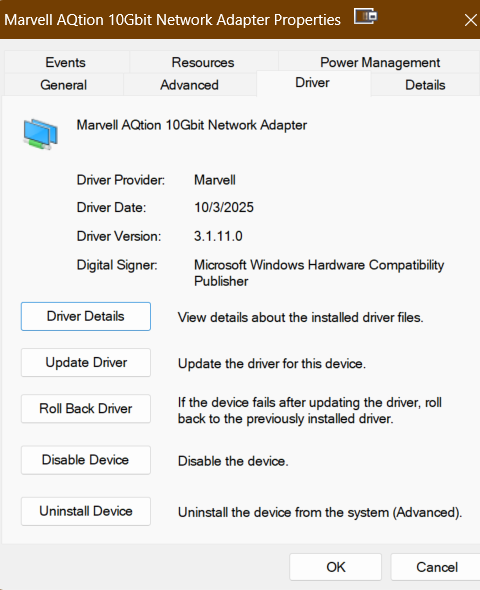
The Marvel AQtion 10bit network adapter became my next suspect. When I tried to update the driver, Device Manager told me I had the most recent version of it, so I wrote off the most obvious solution. Guided by random posts online I started fiddling with the advanced settings on the network adapter. Several posts said to turn off the ‘Energy Efficient Ethernet” so I tried that but it didn’t help. I was reluctant to turn off the flow control. Instead I went to see if there was maybe a better driver on the Marvel site. And oh boy was there: the one on the Marvel site is several versions and a few years newer than the one Microsoft claimed was the latest.
So I downloaded an installed the Marvel AQtion 10bit network adapter version 3.1.11.0, instead of the version 3.1.7 or such that I had before. And voila.
Just two questions: What took me so long? And, do I turn the ‘Energy Efficient Ethernet” switch back on?

